
Seamless Video Meetings from Google Calendar
Overview
The Avaya Agenda Chrome extension is designed to streamline video meeting participation and scheduling directly within the Google Chrome browser. By integrating with Google Calendar, it allows users to join and manage Avaya Spaces or Avaya Equinox meetings without switching between applications. This tool is particularly useful for professionals who rely on timely, efficient collaboration across multiple platforms. The extension enables users to view their calendar events while browsing any webpage, enhancing multitasking capabilities during work sessions.
Targeted at business users, remote teams, and individuals utilizing Avaya’s cloud-based collaboration suite, the extension enhances workflow continuity. It supports seamless access to Avaya Spaces, which offers voice, video, task management, and file sharing in a unified environment. While the extension itself is free, it requires a valid subscription to Avaya Spaces (Plus or higher) or Avaya Equinox to function fully. This ensures that only users with appropriate licensing can access advanced meeting features.
Real-world use cases include scheduling recurring team check-ins, joining urgent meetings from a browser tab, or monitoring calendar commitments while researching or drafting documents. The extension is ideal for hybrid work environments where cross-platform accessibility and minimal context switching are essential.
Key Features & Capabilities
- Calendar Integration – Syncs with Google Calendar to display upcoming meetings and provide one-click access to Avaya Spaces or Avaya Equinox sessions.
- Meeting Scheduling – Allows users to create and schedule video meetings directly from their Google Calendar interface using Avaya’s platform.
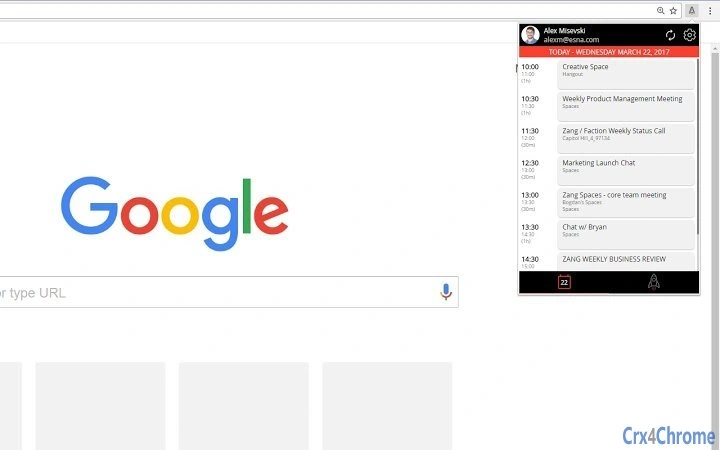
- Contextual Access – Enables viewing calendar events from any webpage, improving focus during research or content creation.
- Avaya Spaces Access – Provides direct navigation to Avaya Spaces from the browser, reducing the need to open a separate application.
- Multi-Platform Availability – Functions across Windows, Mac, and Linux systems when used with Google Chrome.
These features help reduce workflow interruptions by consolidating meeting management into a single browser interface. For example, a project manager can schedule a client meeting, review related documents, and join the session—all without leaving their current browser tab. Similarly, team leads can monitor upcoming deadlines and initiate meetings instantly from their calendar view. The extension supports real-time collaboration needs in fast-paced work environments.
User Interface, Workflow & Performance
The Avaya Agenda Chrome extension presents a clean, minimal interface that integrates directly into the browser’s toolbar. Users can access meeting details, schedule new sessions, and join ongoing calls through a simple dropdown menu. Navigation is intuitive, with clear icons and labeled options, making it accessible even for non-technical users.
Workflow efficiency is enhanced by eliminating the need to open a separate application or switch between tabs. The extension operates in the background, syncing with Google Calendar and Avaya’s cloud services without requiring constant user input. While specific performance metrics such as CPU or RAM usage were not provided, the 3.2 MB installation size suggests a lightweight footprint, which typically correlates with low resource consumption.
Stability appears to be maintained through consistent integration with Google Chrome’s extension framework. The developer did not specify resource usage details, but general behavior indicates reliable operation during standard workloads. Users can expect smooth performance during routine calendar interactions and meeting joins.
Compatibility & System Requirements
The Avaya Agenda Chrome extension is compatible with Windows, Mac, and Linux operating systems. It is designed to run exclusively within the Google Chrome browser, ensuring consistent behavior across supported platforms. The installation size is 3.2 MB, which is relatively small and indicates minimal disk space usage.
Exact system requirements were not listed. The developer did not provide additional system requirements beyond the supported OS and browser. Compatibility with older versions of Chrome was not specified. Users should ensure their Chrome browser is up to date to maintain optimal functionality and security.
Pros and Cons
Pros
- Seamless integration with Google Calendar for quick meeting access
- Direct scheduling and joining of Avaya Spaces/Equinox meetings from the browser
- Lightweight design at just 3.2 MB
- Available on Windows, Mac, and Linux
- Free to download and use
Cons
- Requires a paid Avaya Spaces (Plus or higher) or Avaya Equinox subscription
- Functionality limited to Google Chrome browser only
- No information on support for other calendar platforms
- Exact performance impact on system resources not disclosed
- Limited to users already subscribed to Avaya’s collaboration services
FAQ Section
Is the Avaya Agenda Chrome extension free to use?
Yes, the extension is available at no cost. However, full functionality requires a valid subscription to Avaya Spaces (Plus or higher) or Avaya Equinox.
What operating systems does the extension support?
The extension is compatible with Windows, Mac, and Linux systems when used with the Google Chrome browser.
Do I need a separate account to use this extension?
Yes, you must have an active Avaya Spaces or Avaya Equinox account with a subscription that includes meeting capabilities.
Can I use this extension offline?
Offline access is limited. The extension requires an active internet connection to sync with Google Calendar and access Avaya’s cloud services.
How often does the extension receive updates?
Updates are managed through the Chrome Web Store. The latest version is 2.0.0, released on May 23, 2024. Users are encouraged to keep the extension updated for optimal performance and security.
Final Thoughts + CTA
The Avaya Agenda Chrome extension delivers a focused, efficient solution for professionals who depend on timely video meetings and calendar synchronization. Its tight integration with Google Calendar and Avaya’s collaboration platform reduces friction in daily workflows, making it ideal for remote teams and hybrid work environments. While it requires a paid subscription to unlock full functionality, its free availability and lightweight design make it a compelling addition for existing Avaya users.
For those already using Avaya Spaces or Equinox, this tool enhances productivity by minimizing context switching and improving meeting accessibility. Its clean interface and cross-platform support add to its appeal. However, users without a subscription will find the extension unusable.
Download Avaya Agenda now and elevate your meeting experience directly from your browser.







